How to use it
- Type your name in the box. Letters and numbers are converted; spaces and other characters stay as they are.
- Pick a decoration on top (꧁ ꧂, 亗, ★彡 and more), or keep it plain.
- Tap Copy next to the style you like, then paste it into the name box in Free Fire MAX.
Why some styles show as boxes (□)
These styles are made from special Unicode letters, not from a font file. If your phone — or the game — does not have a character, it shows a box or a question mark instead. That is not a problem with your name; just try another style. Bold, Sans and Double-struck styles are usually the safest bet.
Keep it short
Each card shows how many characters the name uses. Fancy letters and symbols count as characters too, and decorations add several at once. If the game rejects a name or cuts it off, remove a decoration or shorten the name. Names marked in orange are long — test them before you pay for a rename.
Before you change your name in the game
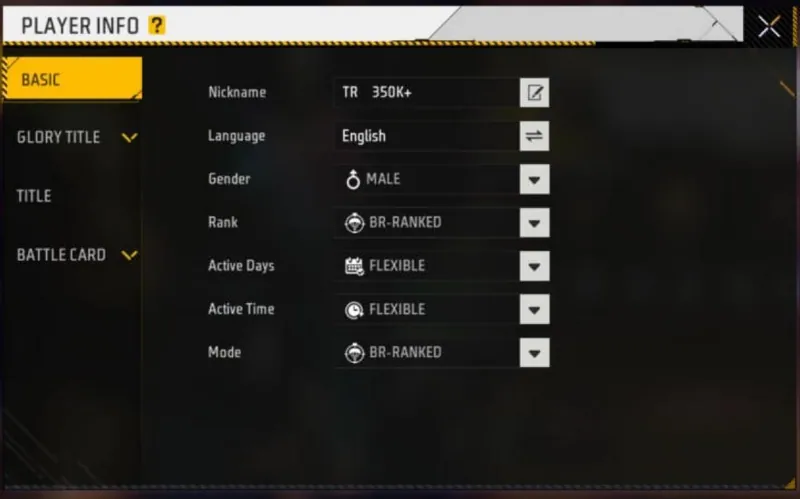
- Where to change it: tap your avatar in the lobby → the gear icon on your profile card → Player Info → the pencil next to Nickname.
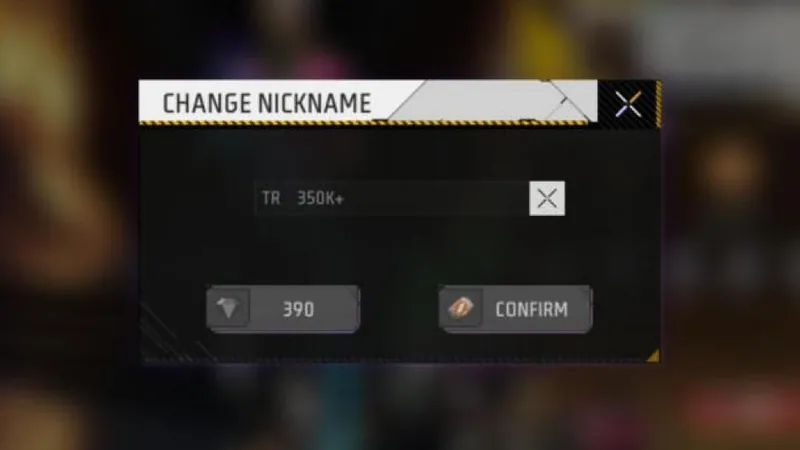
- A rename costs 390 diamonds or a Name Change Card (what our game showed on 9 October 2026). Check the price on your own screen before you confirm.
- Paste the name in the box first and check how it looks. If you see boxes, cancel and pick another style.
- Names that copy another player's identity or include offensive words can get reported. Keep it yours.
More for Free Fire MAX players
Check our verified redeem codes, the Free Fire MAX events calendar, and the four new guns that arrived on 1 October.